When an AI Workflow Actually Needs a Human Operator
A practical architecture analysis: where human-in-the-loop belongs, how to define input/output, and cases where you shouldn't automate at all.
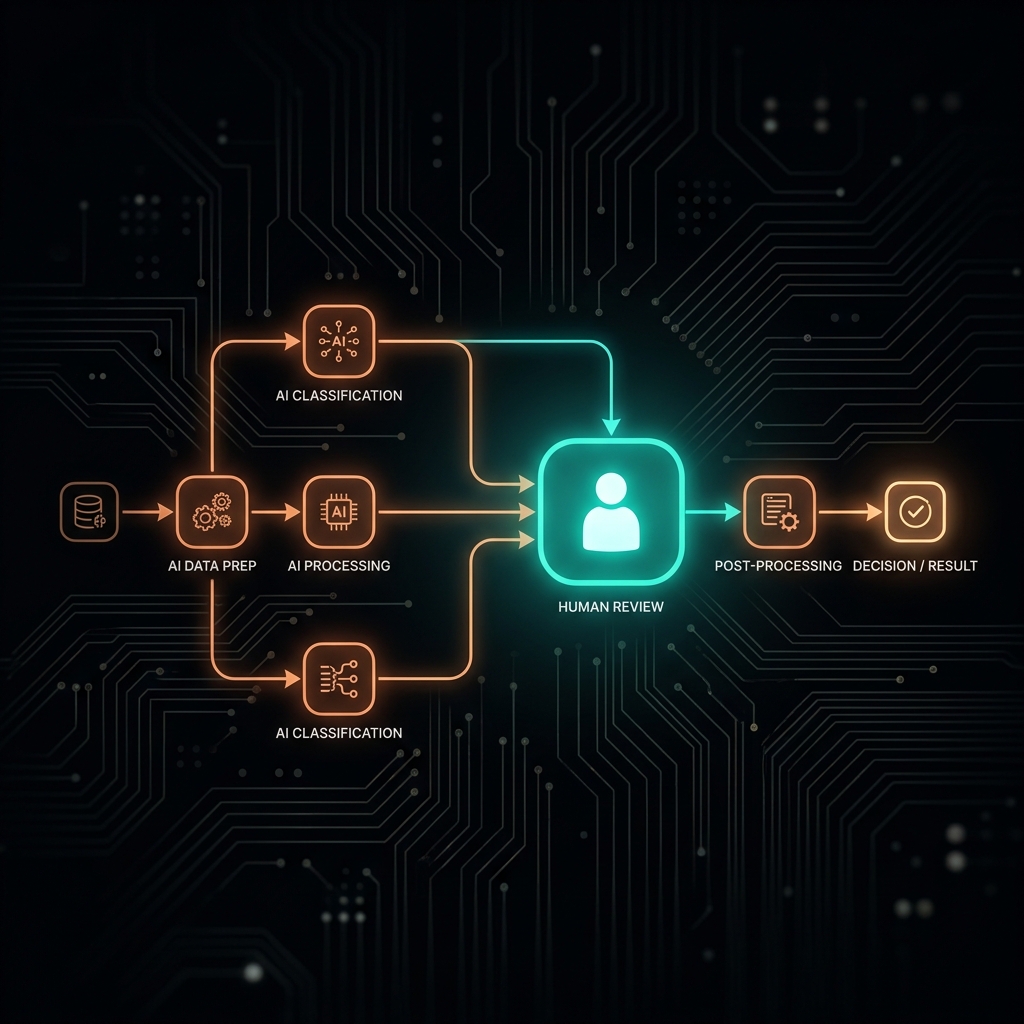
When an AI Workflow Actually Needs a Human Operator
TL;DR: An AI workflow that works in a demo doesn't mean it works in production. The most common gap is missing 3 layers: (1) handling malformed input, (2) alerting on silent failures, (3) a human review point before important output. This post analyzes architecture — it's not a tool-installation tutorial.
Quick Answer
An AI workflow needs a real human operator when: its output directly affects customers or finances, when its processing logic depends on constantly-changing context, or when the system doesn't yet have enough historical data to evaluate how reliable the AI actually is. An "operator" isn't "someone who approves every single step" — it's the person who designs and maintains the oversight system.
There's a pattern I see repeat at almost every business starting out with an AI workflow:
Week 1: an impressive demo, the workflow runs smoothly. Week 4: the workflow is still "running" — but 20–30% of the output is wrong, and no one knows. Month 3: the problem surfaces because a customer complains, or the reporting numbers look off.
It's not that the workflow was built wrong. It's that the right oversight layer is missing.
Why a workflow performs well in a demo but breaks in production
Demo and production differ in 3 core ways:
1. Demo data is usually "cleaner" than real data
When you demo a workflow, the input is usually data you prepared yourself — correctly formatted, every field filled, no unexpected values.
Real data from customers, forms, emails: missing fields, inconsistent formatting, special characters, null values. A workflow not designed to handle these edge cases will error out — or worse, silently process them incorrectly.
2. Volume and frequency differ from the test scenario
You test the workflow with 10 records. Production runs 200 records a day. Rate-limit issues, timeouts, or data conflicts only show up at real scale.
3. Context changes over time
Business processes change. What was the "correct" answer for the workflow 3 months ago might not be correct today. But the workflow doesn't know that on its own — it keeps running on the old logic.
A 3-layer oversight architecture for a sustainable workflow
This is the framework I use when designing a workflow for any process that matters.
Layer 1: Input Validation — before AI starts working
Every workflow needs a step that checks input before processing:
[Raw Input]
    ↓
[Validation Layer]
    ├─ Valid input → continue the workflow
    └─ Invalid input → log + send an alert + STOP
Validation doesn't need to be complex — but it needs to be specific:
- Are all required fields present?
- Is the format correct (email, phone number, date)?
- Is the value within an allowed range?
If the input is invalid: don't keep processing, don't guess, don't self-correct — log it and wait for a human.
Layer 2: Human Gate — before important output
Not every step needs human review. But there must be at least one stopping point before output leaves the system or affects a customer.
[AI Processing]
    ↓
[Draft Output]
    ↓
[Human Gate: Review & Approve]  ← the most important point
    ↓
[Final Output → External System / Customer]
A Human Gate doesn't mean someone sits and approves every single record all day. It can be designed more intelligently:
- Batch review: AI processes 50 records → groups them → a human reviews once, in 15 minutes
- Exception review: AI auto-approves high-confidence cases, only flagging low-confidence cases for human review
- Sample review: randomly pull 10% of output for periodic human checks — not everything, but enough to catch drift
Layer 3: Monitoring & Alert — after the workflow runs
This is the layer most often skipped.
The question: if the workflow fails at 2am and no one knows until 9am the next morning — how many records were affected?
Minimum monitoring you need:
- Error alert: when the workflow fails, send an immediate notification to Slack/email — don't wait for someone to discover it
- Volume check: if the number of processed records drops unexpectedly (e.g. from 100/day to 20/day) → alert
- Output quality check: periodically check for drift — is the AI's logic still producing results that match current expectations
4 signs your workflow is missing a human operator
Sign 1: You don't know whether the workflow is even running
If you have to log into Make.com or n8n to manually check whether the workflow ran today, that's a monitoring problem, not a technical one.
Sign 2: When something breaks, you find out later than your customers do
A customer reports "I didn't get a confirmation email" and you had no idea — how long has the workflow been broken, and how many customers were affected?
Sign 3: No one can describe what the workflow actually does
If only one person knows how the workflow works and that person leaves, that workflow is a single point of failure.
Sign 4: The workflow has never been reviewed since going live
A workflow isn't "set and forget." The business changes, data changes, APIs change. A workflow needs periodic review — at least once a month for the first 3 months, then quarterly after that.
When you shouldn't automate — even if it's technically possible
This is a point few workflow tutorials say plainly:
Don't automate when:
- The process is still changing week to week — building a workflow for an unstable process is wasted effort
- A single wrong output could cause an unrecoverable consequence (e.g. financial transactions, legal contracts)
- There's no one responsible for operating and maintaining it after it goes live
- Volume is too low to justify the setup cost (if it's only 5 records a week, doing it manually is faster)
Automation is a tool — not a goal.
Go deeper — based on where you are
If you want to understand human-in-the-loop in more detail:
- What Is Human-in-the-Loop — and When AI Needs Human Control
- AI Workflow for Vietnamese Businesses — A Real-World Architecture
If you're building a no-code workflow and want to understand its limits:
Where is your workflow right now — a stable demo, or sustainable production?
In an Audit session, I'll look at your current workflow architecture and point out which layer is missing, where the risk is, and what it takes for the workflow to run reliably for 6 months without constant intervention.
FAQ
Does human-in-the-loop slow down a workflow?
Yes — if designed poorly. A human gate should be designed to minimize review time: batch the cases that need review, show enough context to decide quickly, and don't require reviewing all the raw data. The goal is reviewing 50 records in 15 minutes — not spending 5 minutes on each one.
Where should I place a human gate in a workflow?
The rule: right before output that has a consequence that's hard to easily undo. For example: before sending a bulk email, before executing a financial transaction, before updating data in a core system. You don't need a gate at every step — only at the points that matter.
What if the team is small and no one is dedicated to operating the workflow?
You don't need someone dedicated — you need someone accountable. It can be you, the founder, spending 30 minutes a week reviewing logs and sample output. What matters more is having a review schedule, not having a dedicated staff member.
When should I upgrade from no-code to a more complex solution?
When the workflow has more than 10 complex steps, needs high uptime (99%+), processes sensitive data that requires full control, or has volume high enough that no-code cloud cost exceeds the cost of self-hosting. This is an architecture question — not "learn more code."
Khám Phá Kho Workflow & SOP AI Thực Chiến
Thư viện quy trình, SOP vận hành và công cụ AI tôi đang dùng thật cho hệ thống của mình — chọn đúng thứ bạn cần.