How to Install Hermes Agent on VPS and Connect to Telegram Instantly
Guide to setting up Hermes Agent on Ubuntu VPS, creating a bot, and connecting it to Telegram to control your Agent 24/7 in 10 minutes.

How to Install Hermes Agent on VPS and Connect to Telegram Instantly
Running AI Agents locally is great for testing and experimentation. However, it has a critical flaw: once you shut down your machine or lose internet connection, the Agent immediately stops. In my introductory article on Hermes Agent, I broke down the difference between autonomous agents and chatbots. To build an AI assistant that truly works 24/7, running your Agent in the background on a remote server is mandatory. In this guide, I will show you how to deploy Hermes Agent (Nous Research's open-source project) on Hostinger servers using two approaches: a 1-Click Managed App or Manual Setup on a KVM VPS.
TL;DR:
How to install Hermes Agent on Hostinger? You can do this in two ways: Method 1: Use the Managed Hermes Agent 1-Click App directly from the Docker catalog in Hostinger's hPanel. This automatically sets up the container, integrating the AI Gateway (Nexos.ai) and Oxylabs Web Scraping. Method 2: Provision a KVM VPS running Ubuntu 22.04 LTS (I recommend choosing a Malaysia server location for ultra-low latency of ~78ms to Vietnam), connect via SSH to run the automated installation script:
curl -fsSL https://raw.githubusercontent.com/NousResearch/hermes-agent/main/scripts/install.sh | bash, and then configure your Telegram bot and API keys in the~/.hermes/.envfile.
1. Managed Hostinger Hermes vs. Self-Managed KVM VPS

Hostinger is pioneering support for the AI Agent ecosystem by integrating Hermes Agent directly into their hPanel. Below is a detailed comparison to help you choose the right solution based on your technical expertise and operational scale:
| Criteria | Managed Hermes Agent (1-Click) | Hermes VPS KVM (Self-Managed) |
|---|---|---|
| Cost (Promo) | VND 199,900 / month (Reg: VND 585,900) | VND 241,900 / month (Reg: VND 635,900) |
| Infrastructure | Shared Container Infrastructure (Dynamic) | Dedicated: 2 vCPU, 8GB RAM, 60GB NVMe SSD, 8TB Bandwidth |
| System Access | Minimal Web UI & Browser Console | Full Root SSH Access, deep system file customization |
| Built-in API Integrations | Pre-integrated Nexos.ai (AI Gateway) & Oxylabs (Scraping) | None (Requires manual configuration of personal API keys) |
| Setup Difficulty | Easiest (1-click, GUI configuration) | Moderate (Requires CLI, SSH, and Vim/Nano proficiency) |
| Latency to Vietnam | Depends on auto-allocated region | Ultra-low (~78ms) when choosing Malaysia Datacenter |
💡 Get Hostinger KVM VPS Special Offer
To lock in the best discount (up to 50% for long-term billing cycles) and support my community, you can sign up directly via my official referral link below:
2. Option 1: 1-Click Managed Hermes Agent Installation via hPanel
From Hostinger's dashboard, navigate to the AI Assistant section on hPanel, search for Hermes Agent, and click Get Started.
The system will recommend the Managed plan. For the best price-performance ratio, opt for the 24-month subscription to secure the promotional price of VND 199,900/month (regularly VND 585,900/month).
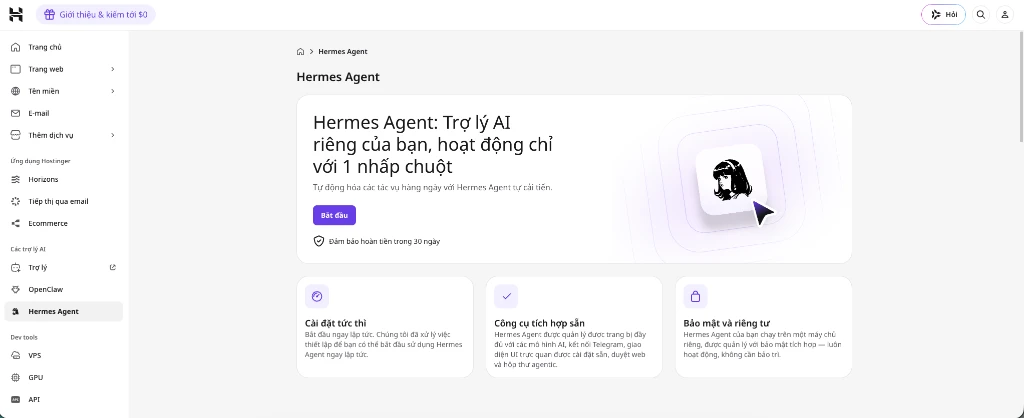
Step 1.2: Parameter Setup and App Activation
In the hPanel Docker Catalog:
- Set your administrative Username and Password for the Hermes Agent Web UI.
- Activate the built-in Nexos.ai AI gateway (your account comes pre-loaded with trial credits to call models like GPT-4o, Claude 3.5 Sonnet, and Gemini 1.5 Pro).
- Enable Oxylabs Web Scraping so your Agent can perform real-time web searches without IP blocking.
- Click Deploy. Hostinger will automatically spin up the container, configure the Traefik reverse proxy, and provision an SSL certificate (HTTPS). You will receive an access URL formatted like
https://hermes-agent-yourid.hostingerapp.comimmediately.
3. Option 2: Manual Installation on Hostinger KVM VPS (100% Control)
If you are a developer looking to customize the Hermes Agent source code or build custom skills, manually installing it on a dedicated VPS is your best route.
Step 2.1: Choose a Hostinger KVM VPS Plan
Head over to Hostinger's VPS registration page. I recommend starting with at least the KVM 1 plan ($6.49/month) or, ideally, the KVM 2 plan ($8.99/month) to get 2 vCPU cores, 8 GB of RAM, and 60 GB of high-speed NVMe SSD storage.
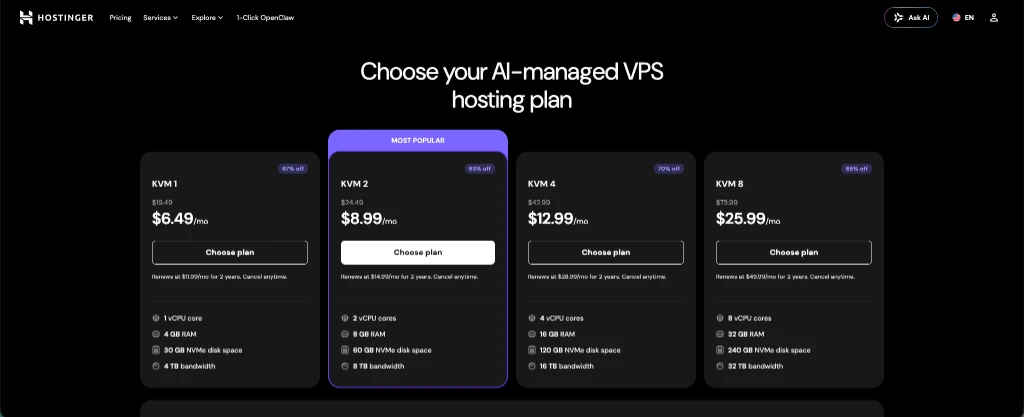
Step 2.2: Choose Billing Cycle and Server Location
When configuring your order in the cart:
- Billing Cycle: Choose the 24-month cycle for the deepest discount, bringing the price down to VND 241,900/month (saving up to VND 9,456,000 compared to monthly billing).
- Datacenter Location: Select Malaysia (the best latency for Southeast Asia/Vietnam at around 78 ms). This keeps your SSH sessions and Agent responses snappy.
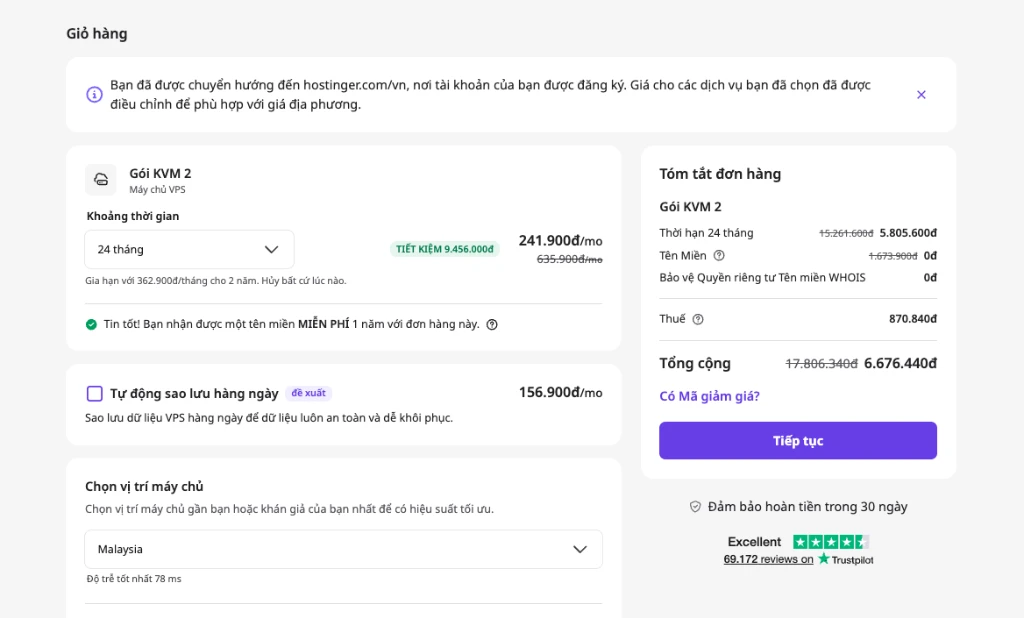
Step 2.3: OS Initialization and SSH Installation
Once your payment is processed, go to your VPS hPanel dashboard and:
- Select your OS: Ubuntu 22.04 LTS.
- Set your root password and copy the Public IP.
- Open your local terminal and connect via SSH to update the system and run the installation script:
# Kết nối vào VPS thông qua terminal (thay IP_VPS bằng IP thực tế của bạn)
ssh root@IP_VPS

# Cập nhật và vá bảo mật cho hệ thống Ubuntu
sudo apt update && sudo apt upgrade -y

# Tải và chạy script cài đặt tự động Hermes Agent chính thức từ Nous Research
curl -fsSL https://raw.githubusercontent.com/NousResearch/hermes-agent/main/scripts/install.sh | bash
4. Connecting Telegram Bot for 24/7 VPS Control

Whether you choose Option 1 or Option 2, linking Hermes Agent to Telegram allows you to interact with your Agent seamlessly on the go without needing a computer.
Step 3.1: Create a Telegram Bot via @BotFather
Open Telegram on your phone or computer, search for the official @BotFather account (verified with a blue checkmark), and do the following:
- Send the message
/newbot. - Enter a display name for your bot (e.g., My Hermes Assistant).
- Enter a username for your bot (must end in
bot, e.g., my_hermes_assistant_bot). - The bot will return a secret HTTP API Token. Copy and save this string.
Step 3.2: Retrieve Your Personal Chat ID for Server Security
To ensure that only you can issue commands to the VPS—preventing unauthorized users from interacting with your bot and accessing proprietary data—you must bind the bot to your personal Chat ID:
- Search for the @userinfobot bot on Telegram.
- Send any message to this bot, and it will return your 9-to-10-digit ID (e.g.,
709593227).
Step 3.3: Configure Security Keys on your VPS
⚠️ Data Security Protocol
Never send raw API keys directly to the Bot via Telegram chat. You must configure all keys securely inside your environment file on the VPS via SSH.
Run nano ~/.hermes/.env on your server to edit the configuration file with the following variables:
# File cấu hình môi trường ~/.hermes/.env
TELEGRAM_BOT_TOKEN="Điền_Token_HTTP_API_Từ_BotFather"
TELEGRAM_CHAT_ID="Điền_Chat_ID_Số_Của_Bạn"
GEMINI_API_KEY="Khóa_API_Studio_Của_Bạn"
OPENROUTER_KEY="Khóa_OpenRouter_Nếu_Có"
Step 3.4: Initialize the Gateway
Save the configuration file (in Nano, press Ctrl + O, then Enter to save, and Ctrl + X to exit), then run the command to launch the Hermes gateway:
# Khởi chạy cổng giao tiếp Telegram chạy ngầm
hermes gateway start

# Theo dõi log hoạt động thời gian thực
tail -f ~/.hermes/logs/gateway.log
Once the logs show ✓ telegram connected, the configuration is complete. Open your Telegram bot's chat window and send a message (e.g., "Hello Hermes") to test the response.
5. Summary & Production Recommendations

Combining Hermes Agent with Hostinger infrastructure offers a robust, cost-effective, and always-on autonomous AI assistant setup for small-and-medium enterprises (SMEs):
- If you want to rapidly prototype automation workflows without dealing with command-line operations, opt for Hostinger's 1-Click Managed App starting at VND 199,900/month.
- If you plan to scale, build custom skills, or integrate deeply with local databases, opt for the KVM 2 VPS plan hosted in Malaysia for optimal latency and processing performance.
Read next: Part 3: Leveraging Hermes Agent for Marketing Automation and Self-Learning Content Creation →
⚡ Powered by Toi La Tung — toilatung.com
Khóa Học Hermes Agent Mastery: Từ Zero đến AI Operator Tự Trị
Học miễn phí 100% cách tự thiết lập và vận hành nhân viên AI tự trị Hermes chạy 24/7 trên VPS: điều khiển Telegram, SQLite FTS5 memory và Smart Routing.